
I’m not sure you’ve realised this yet, but you have a superpower. You might just be using it exclusively at work.
If you’re reading this, chances are you already use AI in your professional life. You know how to put it to work, how to make it useful, and maybe even how to save a few hours here and there. Which is already a skill that beats “confident user of PC” on a CV.
But what if you could do the same outside the office?
Think of all the little things in your personal life that eat up your time, especially the ones you find yourself doing over and over again. Some of them could be automated, too. You just need to put in a little effort upfront, and then let that effort pay off over time.
The tricky part isn’t necessarily knowing how to use AI. It’s imagining what else you could use it for.
So, here are eight ways to put your AI skills to work in everyday life, a few things that take some effort to set up, but can make that effort worthwhile many times over.


1. Claude and management of medical history/checkups
My daughter had orthodontic issues, and as with most things orthodontic, they weren’t going to be resolved overnight. When the ENT appointments, speech therapy sessions, physiotherapy, and more than one doctor in each field happened, I realised my head was about to explode.
So I created a folder with Claude working inside it.
It contains all the test results and diagnoses, the steps we’ve taken, the actions required (both daily routines and one-off tasks), the current state of things, and a log of how that state has changed over time.
It helped me not to get crazy at that moment, and honestly, I’m grateful I don’t have to manage the whole thing manually anymore.
Of course, for this to work, you need a clear README file. As usual, Claude can help you create one, too.
Tested on: Opus 5.5
Setup time: About an hour to gather all the documents in one place and create a clear README file.
2. ChatGPT and trip planning
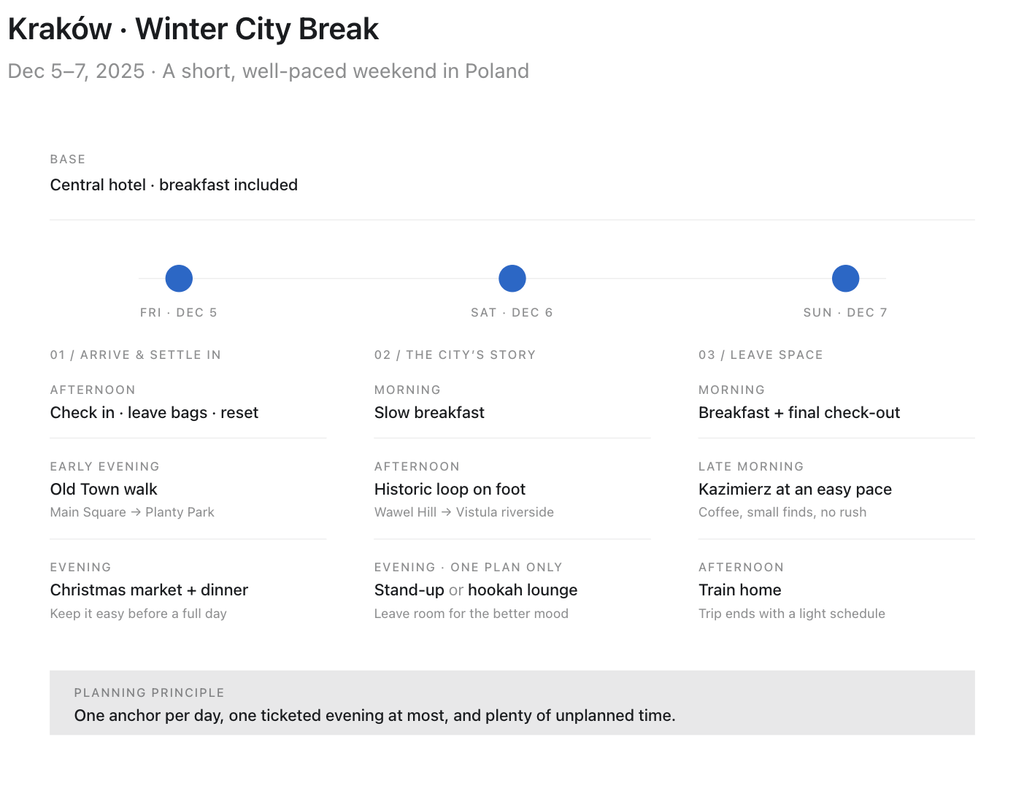
It’s an easy one from a technical point of view, but it does take some initial effort to set up the skill properly. Yes, we’re talking about a skill again, but this time, a very specific one. A skill that knows your travel preferences. The kinds of roads you enjoy, the hotels you’d actually want to stay in, the attractions you love (and those you’d rather skip), who you travel with, and what they like.
Surely, you will have to double-check first outputs. Sometimes, shout in annoyance: “ I can’t go to a stand-up show and then make it to the theater” or “Dark rituals are not my cup of tea!”
But trust me, once you’ve corrected it a few times and it has a better understanding of your preferences, the magic starts to happen. Planning trips becomes quicker, easier, and far less time-consuming.

Tested on: GPT-6
Setup time: 15 minutes for the initial setup; a couple of hours for the first few attempts.
3. ChatGPT and video editing
Remember those times when you wanted to share a video, but first needed to cut a few bits here and there, blur out some personal information, and put everything back together? You’d open a video editor, try to remember how to add a mask, look up the keyboard shortcut for cutting, and figure out how to stitch all the pieces together. An hour later, you might still be struggling to export the finished video.
Well, this feels a little like cheating, but if you have Codex, you can simply give it clear instructions, wait 5–10 minutes, and it is cooked.
Tested on: GPT-5.6 Terra
Setup time: two minutes if you have ChatGPT setup.
4. Claude and learning a language
Basically, you can apply this approach to almost any topic, but languages are a good example. Let’s imagine you’ve decided to learn Polish (I’m learning it myself, so let’s imagine you are, too). And then, just out of nowhere, you decide you need to pass a B1 exam.
How would you do that?
First, take a test to find out your current level. You can use AI or any ready-made test online. Then upload the results to Claude, including all your mistakes, not just the final score.
Next, ask Claude to create a folder where it will track your current level and build a study plan for the time you have until the exam, focusing on your typical mistakes.
Then, ask Claude to create a skill that generates weekly grammar notes and tests. You’ll probably need to fine-tune it a little. For example, ask it not to group questions of the same type, because that makes the answers too easy to guess. Or ask for more writing exercises instead of multiple-choice questions.
After that, just follow the plan, upload photos of your handwritten exercises (Claude handles Polish handwriting just fine, by the way), and use your favourite learning methods as easily as sneezing.
For example, I like Anki cards — flashcards with a front and back that keep coming back until you remember the answer. I’ve created a skill to generate those, too.

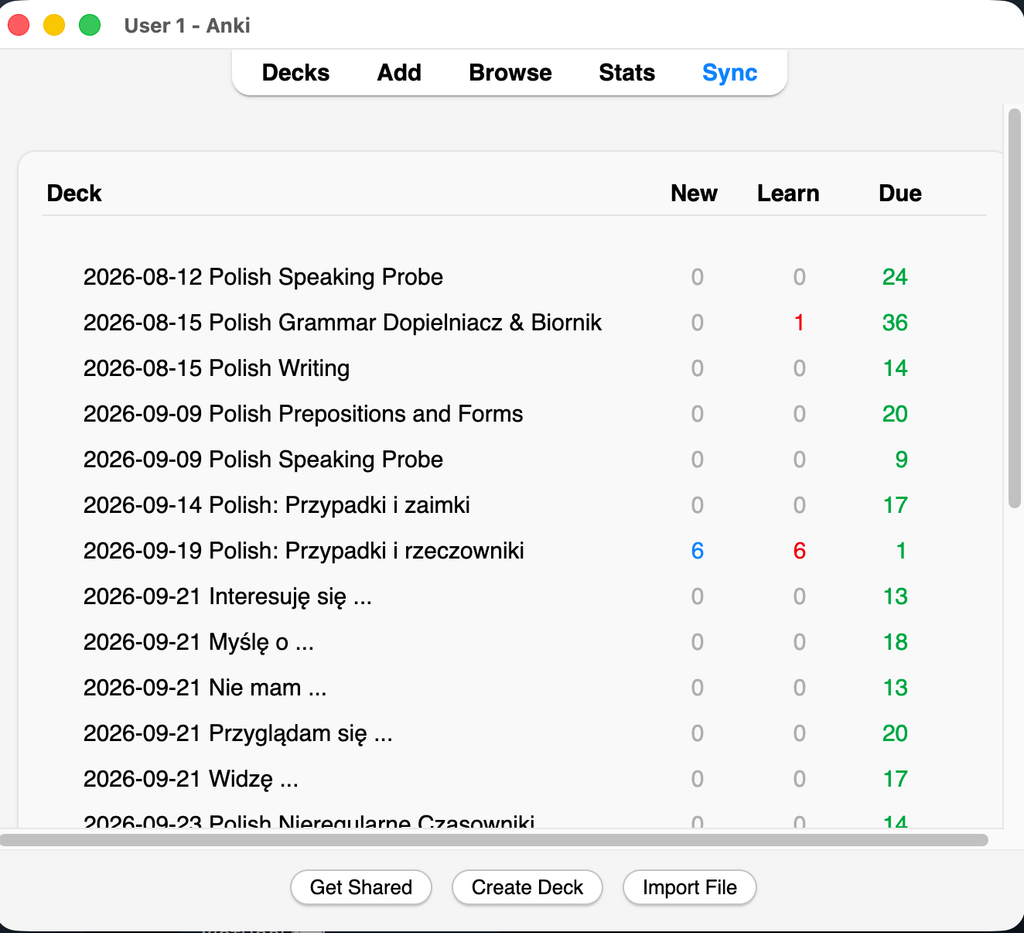

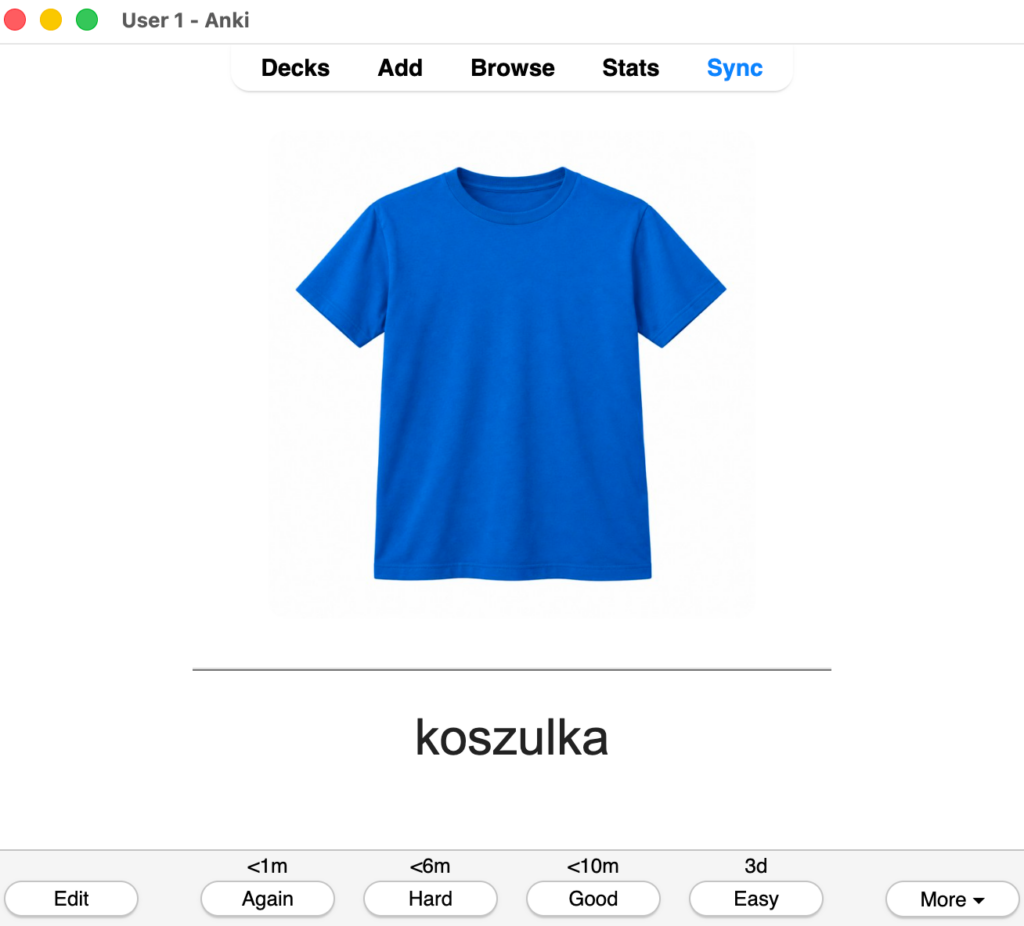
The only weak point is speaking. You can record yourself and get a transcription, but the best way to practise is still with a flesh-and-blood human.
Tested on: Opus 5.5
Setup time: 1–2 hours (mostly spent taking tests, but you need to do that anyway).
5. Claude and tracking expenses
This one gets a little more interesting from a technical point of view, so if you enjoy useful technical challenges, it’s definitely worth a try.
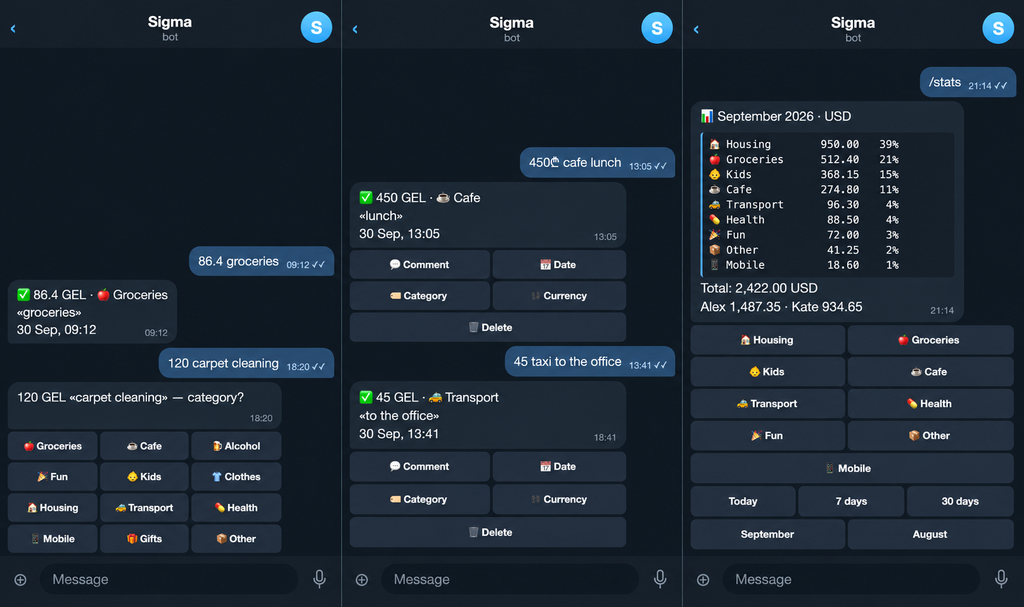
For this, a Markdown file alone won’t cut it. Of course, you can connect everything to Google Sheets, and that’s the easiest option. But if you’re up for a more technical challenge, one possible solution is a Telegram bot + your own MCP server and database + Anthropic API.

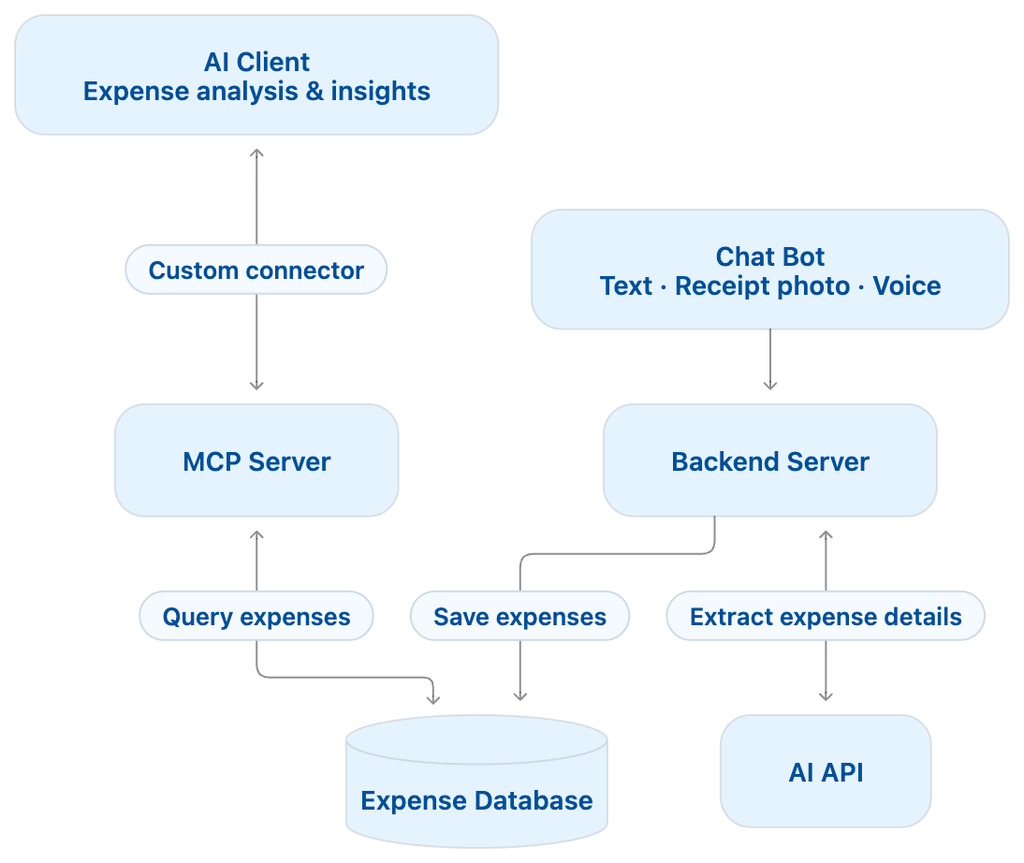
The logic is pretty simple: you send your expenses to the Telegram bot in whatever format you like text, a photo of a receipt, or a voice message. Your server processes the input using the Anthropic API and saves everything to the database. Then, you open Claude Code with your custom MCP server connector and analyse your expenses in whatever way you like.
And if you want to keep costs down, you can start with a free Supabase database and use a Raspberry Pi sitting on your desk at home as your server.

Tested on: Opus 5
Setup time: 3–4 hours.
6. Claude and analyzing personal goals progress
We all have our personal goals and dreams, I hope. And we want them to become true. What if (just if) we forget about the New Year’s resolution on the 2nd of January?
AI can’t make your dreams come true for you, but it can help you track your progress, analyse what’s working, and make sure you don’t forget about them. I’d say that’s already a lot.
Here’s my personal recipe. It requires a Mac + iPhone setup, but I’m sure you can find other ways to do it if you use Android or Windows.
- Set your goals at the beginning of the year.
- Set up Obsidian on your phone with an iCloud vault called Goals.
- Create one Markdown file per month inside this vault.
- Before going to sleep, spend two minutes writing down what you did for your goals that day.
- Once a week, run Claude Code on your laptop and let it analyse the folder synced through iCloud, ask you questions, and help you figure out what’s stopping you from moving forward.
Tested on: Opus 5.5.
Setup time: 30 minutes.
7. Claude and planning upcoming week
Connect your calendar, task tracker, email, and anything else that contains information about your time and tasks. Paper notebooks are a little trickier to integrate, but you can always upload photos of them.
Then, create a skill with Claude or Codex that knows how much workload is reasonable for you (and, again, a feedback loop is essential: check how you feel over the following weeks), what can be delegated, and what can be cancelled.
AI will analyse your tasks and events for the upcoming week, help you organise them, and point out if you have too few happy moments and too many things to do.
Tested on: Opus 5.5.
Setup time: 30 minutes.
8. ChatGPT and buying clothes with a personal stylist
This is my favourite one so far. I’m the kind of person who likes to dress well but is completely incapable of choosing what to wear. So, when ChatGPT started working well with images, I decided to give it a try.
My goal was to build a capsule wardrobe. (A quick explanation: a capsule wardrobe is a collection of clothes that all work well together, so you can create lots of different outfits without owning that many things.)
Here’s what I did: I took a photo of every single thing I own — clothes, accessories, boots — uploaded everything to a folder on my laptop, and asked ChatGPT to analyse it all and put it into a wardrobe.md file.
I also added an optional Notes column, which I filled in myself with things like what I didn’t like about a particular item, whether it was starting to look old, or whether it needed replacing.
Another file, actions.md, contains everything that needs to be done: fix, replace, wash, or buy.
Then, I asked ChatGPT to create a capsule wardrobe, setting a maximum budget for new purchases and giving it a short description of me, my needs, and my daily routines. And it did surprisingly well!
But what amazed me the most was how well it worked when creating outfits for my actual days. I created a create-outfit skill, and now, whenever I need to go out, I ask it what to wear.
I added two requirements: the outfits should be diverse, and they should be appropriate for the weather. I’d also add an instruction to the skill to create a copy of the wardrobe file and keep track of when each item was last worn. Otherwise, the outfits might be diverse for the first few times, but the same combinations could start repeating later on.
And now? None of my clothes or accessories sits unused, I’m always dressed for the weather, and I like how I look — without having to put any effort into deciding what to wear every day.


Tested on: GPT-6.1 Astra
Setup time: 3-4 hours depending on how many clothes you already have.
Put that superpower to work outside the office
I’m sure you can come up with many more ideas for using AI in everyday life. They’re everywhere once you start looking. I’ve heard of people planning their weekly menus with AI or generating games for their kids, for example. I haven’t tried those myself yet, though.
I think we’re entering a new era where so many little things in our lives can be automated. And honestly, that’s both frightening and exciting. Maybe the point isn’t to automate everything, but to stop spending our time on things that don’t really need us and save more of it for the things that do.