
Product teams are increasing their AI budgets as fast as they can adopt new AI tools. In 2025, AI spending on IT services alone reached roughly $85 billion. This is already much more than spending on devices and telecoms combined.
However, a larger AI budget doesn’t automatically mean better AI adoption or stronger ROI. As teams experiment with more AI tools, they also risk spreading budgets, attention, and engineering time across experiments that never become useful products or workflows.
That makes AI budget allocation less about setting a fixed spending limit and more about deciding where AI investment can create measurable business value. The goal is to understand how much to spend on AI tools, where AI costs are coming from, which use cases deserve more investment, and when an AI experiment is no longer worth funding.
In this article, we look at what AI budget and AI spending strategy look like at Railsware (as of summer ’26). As a bootstrapped product studio building its own products and creating them for clients, we focus on measurable outcomes and AI ROI rather than adopting AI simply because a new tool is available.
TL;DR
- AI needs its own budget line. Bundled AI features hide your real exposure across dozens of invoices.
- 78% of IT leaders hit unexpected charges from AI or consumption pricing last year; 61% cut projects over it.
- Cursor adoption at Railsware fell from 25% to 10% after its June 2025 switch to usage credits.
- Fixed subscriptions beat usage-based pricing. A heavy Cursor month can equal 1–2 years of premium Claude.
- An AI policy needs four things: no client data, corporate accounts, AI fluency per role, human final call.
Why AI tools need their own budget line
Not having an AI budget in 2026 would be strange. Yet, treating it like a normal SaaS line item is equally strange, because it doesn’t behave like one.
A normal SaaS subscription is a fixed cost you renegotiate once a year or so. AI tooling is a moving target: new solutions appear, existing ones get better or worse, vendors rewrite pricing, change subscription tiers, and adjust which models are available on which plan. While the AI ecosystem is only in its early stages, the budget is never static.
At the moment, Railsware spends roughly $15,000–20,000 per month on AI tools. This figure covers AI products only, not software that happens to have AI features bolted on. Most SaaS in your stack now ships AI features inside the existing price, which means your real AI exposure is scattered across dozens of invoices unless you deliberately draw a line around it.
There have certainly been short periods when we spent more because a new tool launched, or several teams tested two or three options in parallel to find the best one for a specific job. That’s normal and healthy. What matters is that these spikes eventually end. Teams converge on a single tool, or keep one primary tool alongside a secondary tool on a basic plan for smaller tasks.
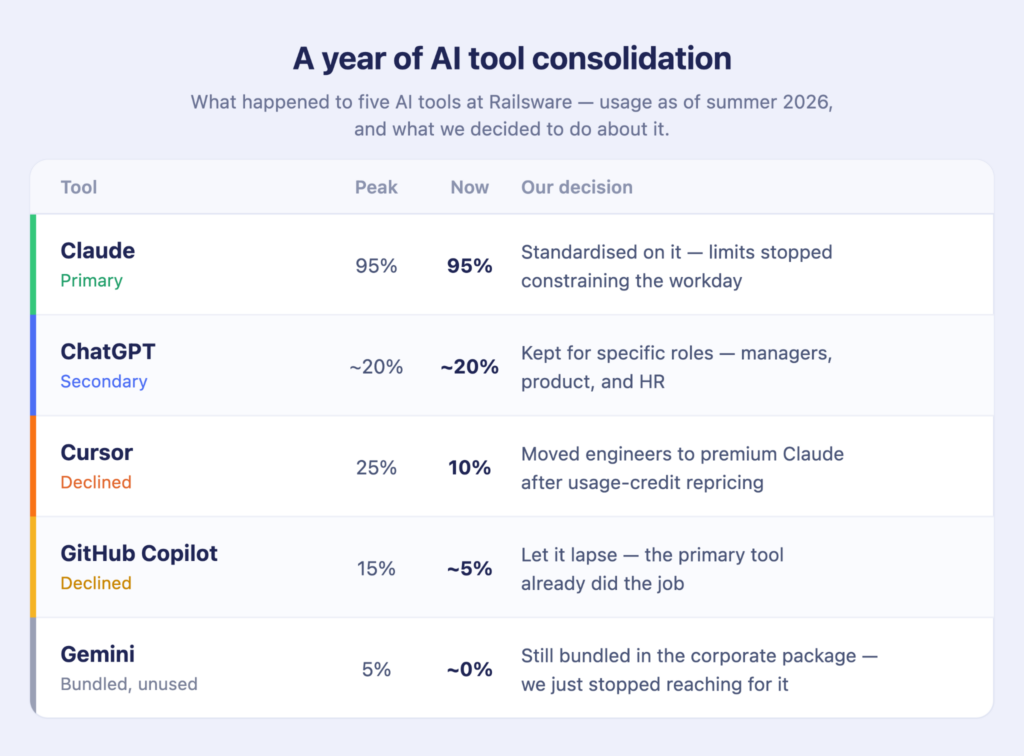
Here’s the snapshot of what deliberate consolidation looks like in practice.
Claude: the industry favorite
Claude is the primary tool for the overwhelming majority of colleagues, including specialists on tech partners’ projects. The reasons are fairly straightforward: a strong price-to-quality ratio, a broad range of use cases, and growing adoption across the technology industry.
The more interesting question, however, is not market share but its efficiency per dollar. When people plan their work properly and make full use of the limits they’re paying for, a premium Team plan license gives most colleagues enough capacity to work throughout the day and week without hitting usage limits. For roughly 95% of our team, the subscription limits are not the constraint.
ChatGPT: around 20%, and mostly secondary
ChatGPT is still used by roughly one in five specialists, primarily managers, product teams, and HR. For them, it tends to be a secondary or auxiliary AI tool rather than the primary one. Usage was heavier previously, but many tasks have since moved partly or entirely to Claude.
GitHub Copilot: a secondary tool, shrinking
Copilot follows a similar pattern. As recently as last winter, around 15% of colleagues were using it. That figure is now roughly three times smaller as teams consolidate their AI tools around fewer primary platforms.
Cursor: from 25% to 10%, mostly on pricing
Cursor was remarkably popular at the start of the year, when limits were generous and fast requests were plentiful. Then came the pricing changes. In June 2025, Cursor replaced request-based limits with a usage-credit model pegged to underlying API costs, and the rollout went badly enough that the CEO publicly apologized and issued refunds.
At the moment, about one in ten Railsware colleagues use it. Half of them are managers who want it as a codebase-analysis tool, the rest engineers. Our rule of thumb: when we see that engineers are primarily using Anthropic models anyway, we move them to a premium Claude licence. Same results, several times cheaper. Cursor, by contrast, can get disproportionately expensive under heavy use, a single request costing $10–20 is not unheard of.
Gemini: popular while it was more generous
Gemini, including Antigravity on a Google AI Ultra subscription for a small group of active users and the standard corporate plan for everyone else, was popular while Google offered discounts and near-unlimited usage.
Even then, only around 5% of employees were genuinely active users, mostly managers working with large volumes of text. After prices increased and usage limits tightened, the tool stopped making economic sense for most of the team. Today, almost nobody uses it. The AI capabilities included in the standard corporate package have limits that are also too restrictive for many practical workflows.
As you can see, four of the five tools above moved significantly in a single year, and none of those moves were driven by capability alone. Pricing model changes drove most of them. Zylo’s 2026 SaaS Management Index found that 78% of IT leaders hit unexpected charges tied to consumption-based or AI pricing in the previous twelve months, and 61% had to cut projects because of unplanned SaaS cost increases.
This is why AI budget planning cannot work like traditional SaaS budgeting. If you set one fixed annual AI spending target and leave it untouched, you’re budgeting for a market that may look completely different by Q3.
A better approach is to budget for reallocation. Set a total AI budget, but expect the money inside that budget to move between tools as pricing, usage limits, and team needs change.
How much companies spend on AI per employee
Per-employee spend is not always one of the easiest ways to benchmark AI costs. And the market data shows there is no single “normal” level of spending yet.
Here’s what stands out:
- Most AI spend still goes to a few general-purpose tools.
OpenAI, Anthropic/Claude, Perplexity, and Mistral account for roughly 72% of total AI spend. Coding tools make up another 18%.
- The gap between companies is huge.
The median AI adopter spends about $330 a month on AI tools. The average is much higher, at around $1,280, because a smaller group of heavy spenders pulls the average up.
- The same pattern appears in per-employee spending.
In July, the median company spent just $11.95 per employee. The top 10% spent $650, while the top 1% reached $7,400 per employee.
- Not all AI spending creates value.
Organizations carried $19.8M in unused license spend this year. As AI adoption grows, companies also need to keep track of which tools people actually use.
What these numbers show is that AI spending varies too much for a single company-wide benchmark to be particularly useful. The right level of investment depends heavily on company size, the roles involved, and how deeply AI is embedded in day-to-day work.
That is why, at Railsware, we do not start with an average AI cost per employee. An average across our organization would hide more than it reveals. We build our own products, work with external partners, and have teams with very different workflows and tooling needs.
In practice, some specialists use less than $100 worth of AI tools per month, while others require $200–300 or more. The goal is not to make everyone fit the same number, but to ensure that AI spending matches the value created by each role.
What has to sit alongside the AI budget
As AI budgets grow, so do the concerns around how these tools are used. Three in four IT leaders say they are moderately to extremely concerned about company data being exposed through AI tools.
At Railsware, we don’t want those concerns to turn into a blanket ban on experimentation. People are free to try different AI tools and find what works best for their jobs. But that freedom comes with a few clear rules.
First, protect the data. Our AI use follows the same information and cybersecurity policies as any other service. That means no passwords, private information, or client data in AI tools. The rule itself is simple; the important part is making sure everyone knows it.
Second, use corporate accounts. We require company accounts and disable training on our data where the service allows it. This gives us more control over how company information is handled and makes AI use easier to manage than a collection of personal, unsanctioned accounts.
Third, make AI fluency part of the job. Different roles need different levels of AI proficiency, so we define what people are expected to know and be able to do with AI tools in their positions. The goal is to make sure people can use the tools effectively and understand where they can go wrong ( and not:).
And finally, keep important decisions with people. AI can generate an answer, analysis, or recommendation, but it doesn’t get the final say. Important outputs need to be reviewed and challenged by a person who understands the context.
This last point becomes increasingly important as AI adoption grows. The more work we delegate to AI, the more important human oversight becomes. Teams need enough human capacity and expertise to review AI-generated work rather than simply accepting it.
That’s what allows us to scale AI experimentation responsibly: give people the freedom to try new tools while keeping clear boundaries around data security, corporate AI accounts, AI literacy, and human oversight.
How to control AI usage and costs
Usage caps seem like the obvious way to control AI spending: set a token limit, a monthly budget, or an alert when usage gets too high. However, AI costs don’t always rise because people use more. They can jump when teams switch to more expensive models or when agentic tools consume more tokens than expected.
That makes usage caps a blunt instrument. They can limit experimentation without addressing the underlying cost volatility.
A different approach is to make the cost predictable before the usage happens. Instead of policing every request, choose pricing models with a built-in ceiling.
That’s the route Railsware took:
We’ve found that subscriptions make AI spending much more predictable than paying for usage at public API rates. If you use 90% or more of a premium Claude plan, for example, you can get a lot of work done within a fixed monthly cost. But push the same volume through a tool like Cursor beyond its included limits, and the cost can jump dramatically, sometimes 20–30 times higher.
In one particularly heavy month, our Cursor usage alone can be equivalent to one or two years of a premium Claude subscription, using the same Anthropic models. So where we can, we prefer plans with predictable limits. And if someone has unused capacity, we let colleagues use it for personal projects rather than letting those limits expire.
How to make AI spending work for the team
The budget tells you what you can spend. It doesn’t tell you what to buy, when to stop, or how to use it well.
That’s why at Railsware we care about building the habits and processes around AI that help teams experiment without creating chaos. Collaborate together to choose tools thoughtfully, keep data safe, and know when human expertise needs to outweigh AI output.
That’s what we’d look for in a development partner, too. Not how many AI tools they can list, but whether they know how to make them useful.
And if that sounds like your kind of approach, we’re always up for building damn good products together.
FAQ
How much should a SaaS company budget for AI tools?
There’s no single benchmark. Median US per-employee AI spend is around $12 a month, but the top 10% of companies spend closer to $650. Such a range reflects how deeply AI is embedded in the work rather than company size. Budget as a range, by role, and expect to reallocate at least once a year. At Railsware, we spend roughly $15,000–20,000 per month on AI tools – that’s ca. $75–100 per capita.
Should AI tools be a separate budget line from SaaS?
Yes. As of 2026, AI pricing changes mid-year far more often than conventional SaaS, and AI features bundled into existing software will otherwise hide your real exposure.
Is it cheaper to use an AI coding tool or pay the model provider directly?
Under heavy use, tools that wrap someone else’s model on usage-based pricing can cost many times more than a premium subscription with the model provider. If your engineers consistently choose one provider’s models anyway, compare the two costs directly.
Should we set token limits for employees?
Caps catch overspend after it happens and encourage rationing. Find the optimal model for your business setup through experiments and trial-and-error.
What should an AI usage policy cover?
Four things: what data can never go into an AI tool, a requirement to use corporate accounts with training on your data disabled, defined AI fluency expectations per role, and a rule that people make the final call on anything that matters.