Let’s address the elephant in the room first. For the past year or two, the industry has been throwing around 10x, 100x, sometimes even 1000x productivity claims for AI-assisted coding. Expectations are sky-high.
But if you’re working on a large, legacy-heavy codebase, tools like Claude Code probably won’t make you 10x more productive in the majority of your work. (And if they do for you, please share your tips and we will all listen carefully.)
What they can do (as of autumn 2026) is save a meaningful amount of time when you build the right scaffolding around them.
In this article, I’ll break down what that looks like in practice:
- which routine engineering tasks are actually worth handing to Claude;
- how hooks, permissions, and deny rules can keep an AI agent inside the lines;
- how to structure the workflow so Claude can move quickly without turning every task into a code-review adventure;
- where it still needs supervision (and where trusting it too much gets expensive);
- and what kind of productivity gains are realistic when you’re working with an existing production codebase.
There’s no silver bullet and no rocket science involved. Mostly, it comes down to making the plumbing work.
So, let’s talk plumbing.

How do I tailor Claude Code to the task?
After experimenting with different ways of working with Claude, I’ve found that the setup matters almost as much as the model itself. So, here is my short list of favourite Claude Code tools.
Here are the skills, I use most often:
- Create PR
- Fix flaky tests
- Collect feedback
I also like giving Claude different roles depending on what I’m trying to accomplish. My most useful ones are:
- Backend developer
- Frontend developer
- QA
- Product manager
The final piece is giving Claude access to the tools where the work lives. My favourites are:
- GitHub: create PR, review, fix CI, check status. This is the loop I’m in constantly, so having it native saves the most context-switching.
- Figma: pulls designs directly into frontend work, so “does this match the mock” stops being a manual check.
- Linear: create tasks or subtasks, read or generate descriptions. Keeps the agents’ output tied back to actual tracked work instead of living only in chat.
What are the three tools that actually earn a place in your daily routine?
If you use the Claude desktop app rather than the terminal, you can switch into Claude Code directly from the app and get the same settings and file structure I’m talking about below. You can also ask Claude to create an agent, skill, or hook for you, and it’ll put it in the right folder.
After months of trying different setups, these are the top ones that earned a permanent place in my workflow.
1. Hooks
Hooks are scripts that run when something specific happens in Claude’s lifecycle. There are quite a few points you can hook into, but the one I get quite a lot of value from is session stop.
I use it to automatically trigger a skill I call Debrief.
The idea came from a very human problem: I would finish a session, realise that Claude had made the same kind of mistake twice, think “I should probably teach it not to do that again”, and then… not teach it.
So I stopped relying on myself to remember.
When a session ends, Debrief collects the useful feedback and turns it into updates to my skills and agents. Claude does have its own memory, but I’ve found that explicitly writing a lesson into the relevant skill works much better for the things I want it to consistently remember.
The result is pretty simple: I don’t have to give Claude the same correction twice.
I also use hooks for less exciting things, like setting up the boring bits of a new session — copying git ignored files when a worktree starts and other project housekeeping. Nothing revolutionary, but exactly the kind of tiny task I’d rather never think about again.
2. Claude Agents View
I spend a lot of time in the terminal, so Claude Agents View quickly became one of those things without which I can’t imagine work with Claude.

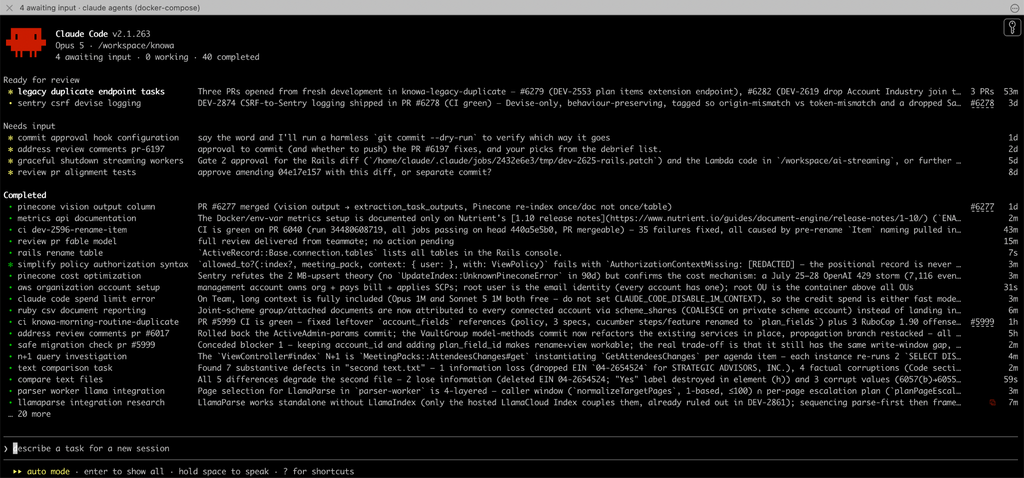
It gives me a live overview of my Claude sessions: what’s running, what’s finished, what needs my attention and what’s ready for review. I can rename and colour-code sessions, which sounds unnecessarily decorative until you have several of them running and they’re all called variation of “hot fix users form”.
It basically gives the terminal some of the situational awareness I like about the desktop app, while letting me keep all the terminal privileges.
I also like staying close to the terminal because new Claude Code features tend to show up there first.
Or, maybe I’m just someone who loves strange things like the shell and the command line, but I think many of you can relate to it.
3. Review with OpenAI ( Codex)
Yes, I ask another model to look at the work, and it is not another Claude model.
I’ll let Claude write the code, then occasionally give it to Codex for a review. I don’t do this for every task (partly because there’s no OpenAI subscription on the project). So, it’s an occasional second pass rather than a permanent part of the workflow. But when I do it, I find it useful precisely because it’s a different model.

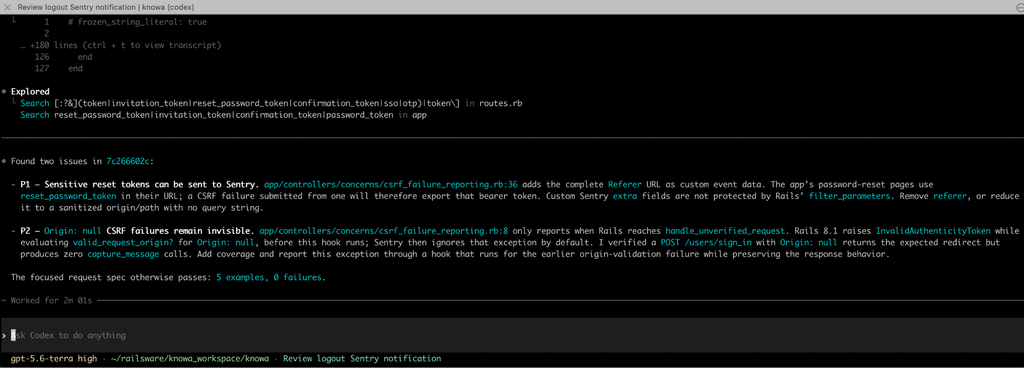
By this point, Claude has already spent the session building a particular solution. I could ask another Claude session, without any context, to challenge it, but I find that bringing in a completely different model family, like OpenAI, often gives me a much more useful second perspective.
I could automate the whole thing with something like ralphex, although there’s a catch: it burns through tokens pretty quickly. Or with the new Orca, an ADE (Agent Development Environment) that lets you use many agents at once. Pretty convenient, right?
Most of the time, I just do it manually. Claude on one side, Codex on the other, copy the review across, make the changes, and briefly feel like I’ve built an extremely sophisticated multi-agent engineering system.
Then I remember I’m just copy-pasting between two windows.
And honestly, that works too.
Security: “ignore all previous instructions” is funny until it isn’t
There’s a moment with AI coding agents when the joke stops being theoretical. You realise that the thing you’ve just given access to can read your files, run commands, touch your database, push code, and, if you haven’t thought about the boundaries carefully enough, do things you absolutely did not mean to ask it to do.
The good news is that prompts work surprisingly well. Most of the time, they do exactly what you asked.
The bad news is that “works most of the time” is a terrible definition of a security boundary.
So I think about security in layers.
1. Isolation is the bigger lever
This is the boundary I’d trust most. Instead of giving Claude access to your everyday development environment, run it somewhere isolated — a VM or container, where a bad command has a much smaller blast radius.
The important question becomes less “Can Claude be trusted not to do something dangerous?” and more “What can Claude actually reach if it does?”
That distinction matters. Even if the agent makes a mistake or follows an instruction it shouldn’t, the damage is contained to the environment you gave it.
2. Add deny rules in settings.json
There are still a few things I don’t want Claude casually attempting, so I add deny rules for them in settings.json. My short list includes:
- No force-pushing to Git — nobody wants to discover that an AI agent quietly rewrote a coworker’s branch.
- No deleting folders or branches.
- No reading environment variables.
One important correction here: deny rules are not a reliable security boundary on their own. Think of them as another layer of defence: they can prevent straightforward mistakes and make the safer path the default, even if a determined or sufficiently creative workaround exists.
The combination is what matters: isolate the environment first, then use deny rules to narrow what the agent should normally be able to do.
3. Add deny rules into auto mode too
Then there are the rules I want Claude to follow but don’t necessarily need to enforce structurally. Things like “don’t send credentials outside this machine” or “ask before doing anything that could affect production.”
Every one of these rules can be worked around (force-push with a different syntax, for instance), but the logic holds: a rule that stops most accidents is worth having even if a determined bypass exists.
Two habits that aren’t AI-specific but matter more now than ever:
- Back up your Claude files, not just your repo.
Skills, agent configs, generated docs — most of this often lives in gitignored territory, which is exactly the kind of thing you don’t think about until it’s gone. A colleague’s laptop died and took a real chunk of accumulated Claude context with it. A separate repo for this costs nothing.
- Give AI its own API keys, on their own budget.
If a project uses OpenAI both in a live feature and for AI-driven testing, don’t let those share billing. A separate project/key for the AI’s own testing traffic means a runaway test loop shows up as a small line item, not a surprise invoice.
What I have tried and quietly dropped

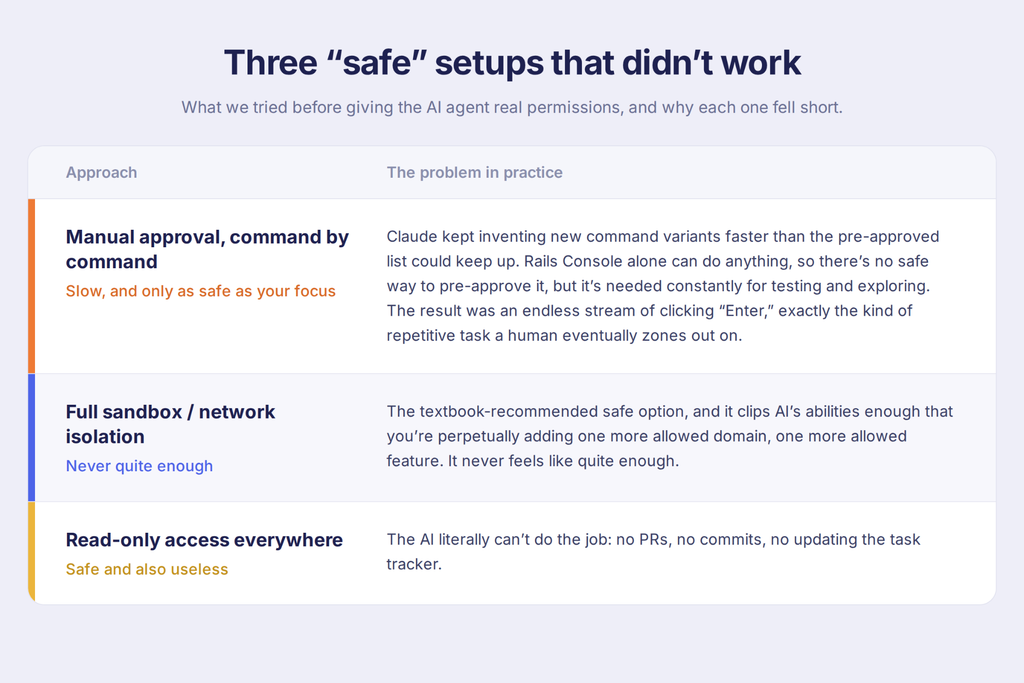
The honest conclusion, almost verbatim from the talk: it’s a balance between effort and security, and everyone finds their own level. There’s a literal “skip all permissions, dangerously” flag available. Not using it. Your risk appetite may differ.
Backlog: How the work actually flows now
The default day-to-day loop hasn’t really changed: plan → review the plan with Claude → implement → review the result → capture feedback → repeat.
That’s the everyday rhythm. Layered on top, four patterns — the first three proven, the fourth still experimental:
1. Cover with tests before refactoring using AI.
Not a novel idea, but it compounds: the team is mid-migration off jQuery (some jQuery, and yes, even a little CoffeeScript, is still hanging around, unapologetically). Where test coverage is solid, review gets lighter, and work moves faster. The safety net is already doing the job a careful human reviewer would otherwise have to do.
2. Match review depth to blast radius.
In an active redesign of a large multi-page feature, backend changes get full-team review; frontend changes are reviewed only by the person who owns that task. Not every line carries equal risk, so the review process stopped pretending otherwise.
3. Pair planning replaced pair coding.
The team used to pair on writing code line by line. Now that AI does most of the typing, that pairing time moved upstream into building shared context and a genuinely solid implementation plan before Claude ever starts. A real example from right before this talk: a pair-planning session produced the implementation plan Claude was executing live during writing this post. Two people thinking through the plan together noticeably improves where the AI lands.
4. Experimental: an AI agent that lives inside the task tracker. Linear (the team’s task manager) has no native Claude integration, so they wired one in using an open-source agent framework called Cyrus. The architecture, roughly:
Assign a ticket to Cyrus in Linear → Linear webhook fires → hits a Cloudflare Tunnel (functionally the same idea as ngrok — a public endpoint pointing at something private) → lands on an isolated machine (in this case, literally a spare laptop) running Cyrus + Claude Code, with its own local repo checkout and its own isolated API keys.

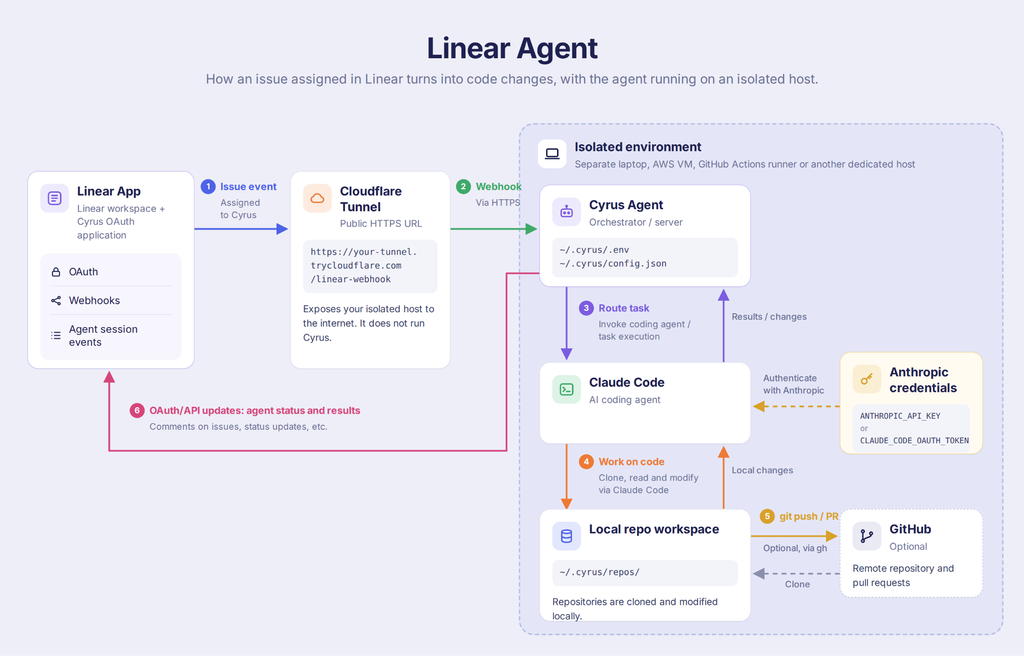
In Linear itself, it shows up as a normal assignment: Cyrus assigned, session finished, click into it to see the full history of what it did and correct course if needed. Because the team doesn’t watch it closely while it runs, it’s currently scoped to small, contained changes, it does reuse the project’s existing skills and agents and opens PRs that follow house conventions, but for anything more complex it’s genuinely hard to verify correctness from the outside. And once you’re pulling the branch down locally to actually check the work, it stops mattering much whether Cyrus wrote it or you did with your own Claude Code session. So for now: useful for the small stuff, unproven for the big stuff. That might change.
FAQ
What’s the easiest way to actually isolate Claude Code without a big DevOps lift?
Docker. Run Claude Code somewhere other than your laptop — a container is enough — so a bad command can’t touch your local filesystem, database, or anything production-adjacent. It’s a more approachable setup than “I’ve never configured Docker” makes it sound; point Claude at the problem and it will build its own contained environment to work inside.
What other hooks besides debrief that can be used?
There are quite a few points in Claude’s lifecycle you can hook into. Beyond Debrief, hooks work well for the boring bits of setting up a new session, like copying gitignored files when a worktree starts and other project housekeeping.
What replaced pair programming once AI started doing most of the typing?
Pair planning. Instead of two people writing code together, planning sessions now build shared context and a solid implementation plan before Claude starts, which measurably improves where the AI ends up, since the plan is what actually steers it.
Can an AI agent work autonomously from the task tracker without someone manually kicking off each session?
Yes, experimentally, one setup assigns tickets to an agent (via Linear’s webhooks and a framework called Cyrus) which then runs Claude Code on an isolated machine and opens a PR following the project’s existing conventions. It’s currently scoped to small, one-line-type changes only, because the team doesn’t closely supervise it while it runs. For anything more complex, it’s hard to verify correctness without pulling the branch down and reviewing it locally anyway, at which point it stops mattering much whether the agent or a person wrote it.
So, are we actually faster?
We estimate work in points, and two recent examples give a pretty good sense of what has changed. One was a refactor of a core feature — extracting document text. The other was a project-wide table rename. Before AI, neither would have felt like particularly small pieces of work. Today, both land at around a couple of points.
So yes, the productivity gain looks real. What we don’t have yet is a clean number for how much faster we are, because the work itself keeps changing. Once something becomes easier, we start attempting things we might previously have avoided or scoped differently. The ruler moves while you’re trying to measure it.
And that may be the more interesting effect of AI: it doesn’t just make existing work faster. It changes what feels worth doing in the first place.
If someone from product management eventually figures out how to measure “we’re working better, faster and more efficiently” without reducing it to lines of code or story points, that’s probably the follow-up talk I’d actually want to attend.