

There’s a lot of advice on how to use AI. Much less on what it actually looks like when you use it at work.
At Railsware, we’ve been figuring out the practical part together. Our engineering, marketing, sales, finance, people, and design teams experiment with AI, test new workflows, and share what actually works in day-to-day work.
Now, we’re sharing those internal sessions with a broader community: our real experiments, tools, workflows, and lessons from people who’ve already tried them. No theory for theory’s sake and endless lists of prompts. Just ideas you can take and try yourself.
Sometimes, that’s all you need: one good idea to make tomorrow’s work a little easier.
For the first story, we’re handing the virtual mic to Viktoriia Ivanenko, Content Lead at Mailtrap, who shares how her team uses AI avatars to scale video production and grew video views by 740%.

TL;DR
– Mailtrap’s content team needed video at volume, but not the overhead of a full production process for every clip. AI avatars solved the constraint.
– The stack matters more than any single tool: HeyGen for avatar video at scale, Veed.io when a clip needs heavier editing, Creatify for social formats.
– Setup is a one-time cost: pick a plan, create an avatar and voice, lock in your brand system, invite the team. After that, a standard talking-head video takes 15–40 minutes.
– A custom brand avatar needs ~3 minutes of properly filmed footage (4K/60fps, good lighting, front and side angles) plus a separate audio recording for the voice clone.
– Three formats that worked: a fictional character (Liam) for dry technical topics; the brand avatar for reacting to breaking new and product updates.
– Budget roughly $120–150/month on HeyGen Business, ~$20 per extra seat.
– AI doesn’t write the script or supply the idea. It removes the production schedule that used to kill good ideas before they existed.
What is Mailtrap?
Mailtrap is an email delivery platform built for product companies with high sending volumes. Teams use it to test emails safely before they reach real users, send transactional email over API or SMTP, run campaigns, and monitor deliverability.
Which means our audience is wide: developers, ops, marketers, founders. Serious product teams who still, thankfully, appreciate content that isn’t dull.
So we needed videos. But we needed videos that a small team could produce quickly, repeatedly, without turning every clip into a production. That constraint is the entire reason AI avatars entered the process.
What results did AI avatars actually deliver?
Comparing 2025 against 2024, after the workflow was in place:
- Views grew by 740%.
- Subscribers grew by 174%.
- Content production volume grew by 446%.
- Organic traffic grew by 123%.
How to choose tools for video production?
We’ve been experimenting with AI avatars since 2024, and after enough testing, we stopped looking for the video tool. The better approach turned out to be building a small stack where each tool does one thing well.
Our setup looks like this:
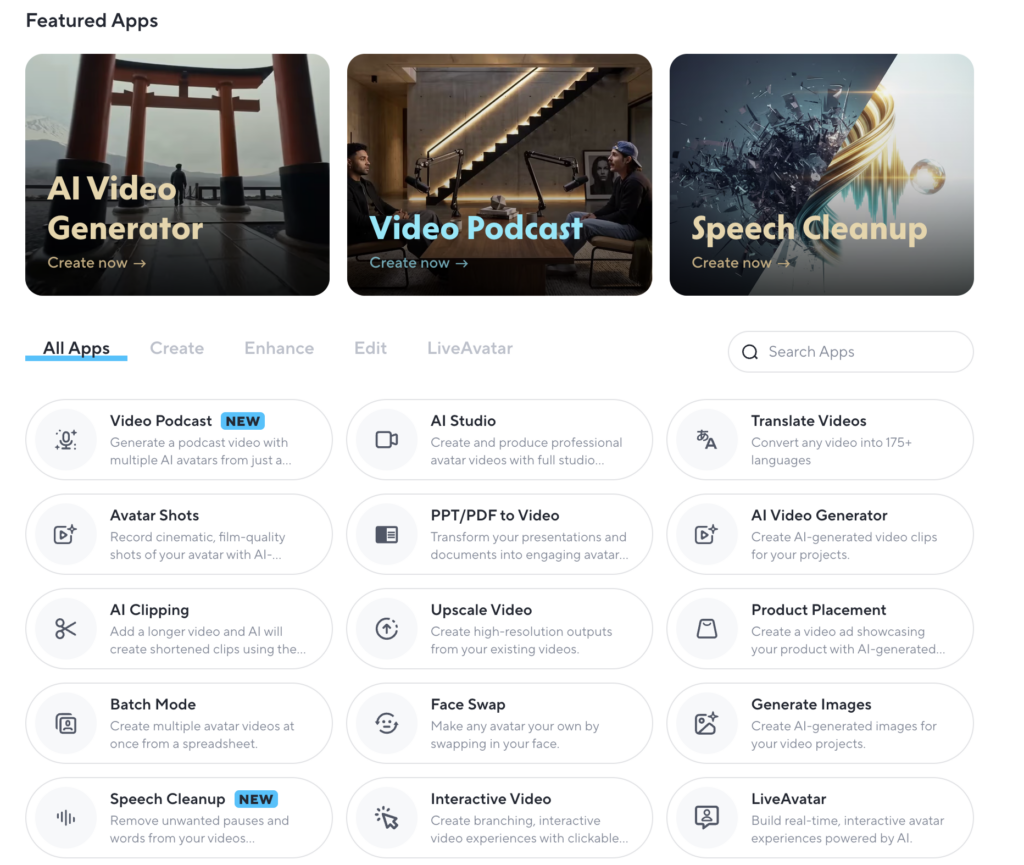
- HeyGen is the foundation. It covers the AI avatar part of our workflow and handles most of the production when we need to create videos at scale.
- If you’re looking for an alternative, Synthesia is probably the first tool I’d compare with HeyGen.
- Fish Audio is another option worth testing if you want a simpler way to create avatar videos.
- Veed.io comes in when a video needs more hands-on editing than a template can provide.
- Creatify is useful for social media marketing formats.
Within HeyGen, we have a few particularly interesting features:
- Instant Highlights: turn a long video into several shorter clips by identifying key moments.
- Upscale Video: when the original footage isn’t quite good enough. If you have a decent recording but the quality could be better, you can improve it without reshooting the whole thing.
- Interactive Video is one we haven’t tested in production yet, but it has interesting potential. It lets viewers choose their own path through a video.
For example, a deliverability tutorial could branch into automatic and manual testing, letting viewers jump straight to the approach they care about. If your audience isn’t one clearly defined persona, this could make the same video much more relevant to different viewers.
There are plenty of other AI features for cleaning up audio, generating videos or images, and turning presentations into videos. A free video AI generator can also help creators produce video content more efficiently without adding a lengthy production process. They’re useful, but they’re not a big part of this particular workflow.

How to set up AI avatar video production
It took me 5–6 hours to figure this out in 2024, with no instructions and no idea what I was doing. You have instructions now, so you’ll be faster. Five steps:
1. Choose a plan
HeyGen has plans for individual creators and teams, so I’d start small. The free plan is enough to test the basics and see whether AI avatars actually fit your workflow. Once you know you’ll use it regularly, you can move to a paid plan.
For our team, Business turned out to be the sweet spot. It gives us the collaboration and brand features we need without going all the way to Enterprise. And when we need another seat, we can simply add one instead of upgrading the entire plan.
If you’re deciding between plans, I’d focus less on the feature count and more on two questions: how many people will use it, and how much of your production do you want to run through it?
2. Create your account and your first avatar
Once you’re in, the next step is choosing an avatar. You have two main options:
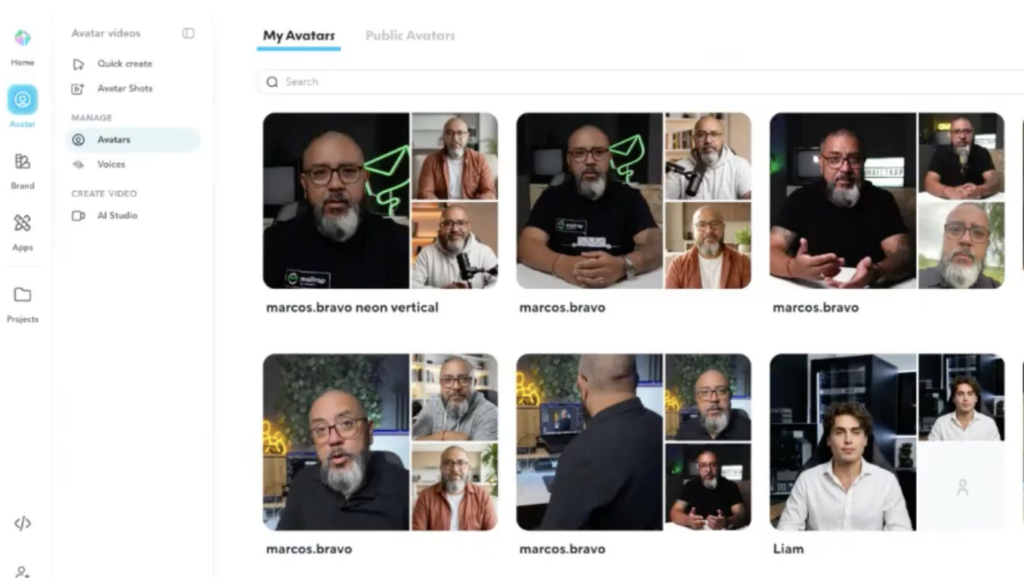
- Brand avatar: a real person from your team, filmed and turned into a reusable AI avatar.
- Library avatar: one of the public avatars from HeyGen’s catalog.
At Mailtrap, we’ve used both, and I’ll show you examples of each later in this article. If you’re just getting started, you can choose both options and start experimenting.
3. Create or choose a voice
The same principle applies to voices. For a brand avatar, you can clone the person’s voice. Otherwise, choose one from HeyGen’s library and filter it by language, accent, and other characteristics.
4. Set up your brand system
Before you start producing at scale, set up the things you want every video to have in common: intros, outros, colors, templates, illustrations, and other recurring elements. The more you standardize upfront, the fewer decisions you have to make every time you create a new video.
5. Bring in the team
If you’re on a team plan, invite your collaborators so drafts, comments, and assets live in a shared workspace instead of somebody’s downloads folder.
And that’s pretty much it. Once these basics are in place, you can move from setting up HeyGen to actually producing videos.
How to film a custom brand avatar
If you want a brand avatar that actually looks natural, the quality of the source footage matters more than you might expect. This is the brief I use when someone at Mailtrap is creating an avatar.
1. Start with consent
Before anything else, make sure the person creating the avatar is involved in the process. HeyGen requires the person being turned into an avatar to upload their own footage and provide consent. The same applies to voice cloning, you can’t do this on someone else’s behalf.
So treat this as part of the commitment: creating a good avatar requires a little time from the person who will represent the brand.

2. Record the main footage
You’ll need around 3 minutes of video, with 2 minutes as the minimum.
For the first ~40 seconds, stay relatively still and speak naturally. After that, move and gesture as you normally would: use your hands, change your facial expressions, and don’t try to look “perfect.”
For the best quality:
- Record in 4K at 60fps.
- A recent iPhone or Google Pixel is enough, you don’t need professional equipment.
- Use good, even lighting.
- Capture both front-facing and side angles.
3. Record extra footage
Then do a second recording with the same technical settings, but this time move around. Walk through an office, down a street, around your home. Anywhere that gives you natural movement and a different environment.
Mix up the formats and locations:
- Horizontal 16:9 and vertical 9:16
- Studio or home setting
- Outdoor or walking footage
4. Record the voice separately
Finally, record the voice on its own, without video. Use a good microphone, speak naturally, and export the recording as an MP3. This recording is what HeyGen uses for the voice clone. It doesn’t simply take the audio from your avatar footage.
How to make your first video from scratch
Once your avatar and basic setup are ready, creating a video is actually super straightforward. This is the workflow we use at Mailtrap.
- Write a script. HeyGen can generate one for you, but I prefer writing or refining the script myself. AI can help with the process, but the final video still needs to sound like a person.
- Go to HeyGen AI Studio.
- Create a new video and pick a horizontal or vertical format.
- Choose your avatar, pick the voice, paste in the script.
- Adjust the brand system (colors, fonts, chapters).
- Preview, generate, download.
And now the one tip: don’t paste your whole script into a single scene. It won’t go well. Break it up so each paragraph becomes its own scene.
Three real cases: how to use AI avatars in video production
Case №1: Liam, AI avatar for less exciting topics
Liam isn’t a real person. He’s a character we built, with a voice chosen specifically for him.
His job is simple: talk about things that aren’t exactly natural entertainment. Email infrastructure. SMTP servers. Deliverability. The kind of topics people need to understand but rarely get excited about.
Instead of presenting another piece of information, we gave that information a character. As a result, Liam’s videos generated 400,000+ views across channels that had previously struggled to get traction.
So, delivery can completely change how people experience dry subject matter. And AI avatars make it cheap enough to test different characters, formats, and approaches without committing to a full production setup.
Case №2: Brand avatar for reacting to industry news
When Cloudflare went down last November, we decided to react while the story was still unfolding.
We quickly put together a video explaining what the outage could mean for emails and what teams could do about it, generated it with our brand avatar, and published it in about 20 minutes.
There was no person to schedule, camera to set up, or room to book. We could go from the idea to a finished video without starting a production process from scratch. With AI video editing, this can be done even quicker. Without that setup, this probably wouldn’t have been a late video. It would have been no video at all: another reactive idea dropped because the moment would pass before we could produce it.
Case №3: Brand avatar for sharing product updates
We also use our brand avatar, Marcos, for product update videos. The format stays the same, we just swap in a new script for each release. That makes product videos quick to produce and removes the usual question of whether a small update is worth the effort.
It also gives us an easy way to scale the same announcement across different markets, we can adapt the script and language without having to organize a new recording every time. After uploading localized versions to YouTube, you can use a YouTube proxy to check whether each video is accessible from its intended country before promoting it.
So should you do this?
Producing video can be genuinely unpleasant, especially when your social channels want it constantly. AI avatars don’t remove the work, yet they do remove the overhead.
AI isn’t a miracle here. You still write the scripts. You still need taste, humor, and a point. What changes is that a good idea no longer has to survive a production schedule to exist. And that turns out to matter across pretty much every function, not just marketing.


FAQ
How long does it take to make an AI avatar video?
Once your brand system and avatars are set up, 15 to 40 minutes end to end for a standard talking-head video.
Do I need a custom avatar to start?
No. The public avatar library covers business and UGC styles and is good enough to test the whole workflow. Custom brand avatars need the Business plan and around three minutes of properly filmed footage, so start with a library avatar and film yours in parallel.
Can I make an AI video of a colleague?
Only with their direct participation. They have to upload their own footage and give consent themselves, and the same goes for voice cloning.
What does an AI avatar workflow cost for a team?
It depends on the flow you choose, but roughly $120–150 per month on HeyGen’s Business plan, plus about $20 per additional seat. Annual billing is cheaper.
Is AI video good enough for customer-facing content?
For product updates, explainers, presentation narration, and reactive commentary — yes, it’s been good enough for us at Mailtrap. And it’s not only useful to marketers; ops and sales teams get the same benefit.
What are the alternatives to HeyGen?
Synthesia is the closest direct comparison for talking-head avatar video. Veed.io is the better choice for heavier editing and creative reels or shorts.